Ptolemy

Would Ptolemy be as famous as Alexander and Ceasar if he had wanted to dare to be?

He lived a decently long life, around 85 years, and passed on opportunities to attempt to succeed Alexander in all his conquered territories, maintaining his property of Egypt and securing it's orbit, Greek coastal towns, and then Corinth (later lost) and a few others. His Egypt was considered well-ordered, and his way with his own men (Macedonians and other Greeks) won him favor among them, and he wasn't unpopular with the natives either for his treatment of them. He founded the Library of Alexandria. After his death, his line ruled Egypt of almost 300 years until Roman's took control with the death of the final Ptolemaic ruler, Cleopatra VII in 30 BC.

When in 321 Perdiccas made an attempt on Egypt and was defeated (and killed by his own men). When the reputedly good-natured and well-liked Ptolemy crossed the Nile to deliver supplies to the invading army, they offered him Perdiccas' regency, but Ptolemy declined.

Had Ptolemy extended himself to his full and just came up against his limits of resources and ability? or did he hold back where others would have dared, and perhaps secured himself a place much larger in history, alongside Alexander and Ceasar?

TTTThis

How to install a Linux OS on a flash drive (not a live USB, but an actual OS on a flash drive).

(I take out my hard drive to be safe but it isn't necessary).

Requires 2 flash drives, referred to here as FlashDrive1 and FlashDrive2.

Download the OS and right-click the file and "Open with Disk Image Writer" or rip the .iso to FlashDrive1 however you want.

Turn off your computer, plug in both flash drives (into slots you know will have power and work on your computer) and start it up again, entering BIOS first to set your boot order so it read FlashDrive1 first (before your regular hard drive OS if you have left that installed).

You should see the options screen and click "Install Ubuntu."

... Method so far does not work so will update later...

TTTThis

Notes on Modular Synthesis

Wft:

These synths work by voltage (in the physical world; digital ones use simulated voltage). When you play a guitar or piano, you're playing different notes by pressing different keys, and each fret or key sounds in its own frequency, high or low. Synths use voltage (higher or lower) to designate a sound. When you increase voltage, you create a high pitched sound; when you decrease voltage going in, your sound becomes lower pitched. They use voltage (higher or lower) to do everything else, too, such as voltage controlled oscillator (making the oscillator pulse more or less rapidly by increasing or decreasing the voltage going in to it) or a voltage controlled filter. If you pump a high voltage into an oscillator, you'll produce a high note. If you put low voltage into a different oscillator (producing a slow transition between its high and low points of oscillation), then push that oscillator into your first high pitched oscillator (thereby controlling your high-frequency oscillator with your low-frequency one), you'll have a high pitched sound, but it will go higher and lower at the rate of your low-frequency oscillator, warbling.

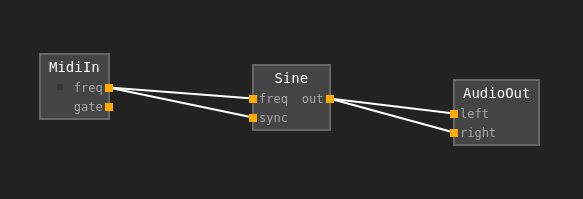
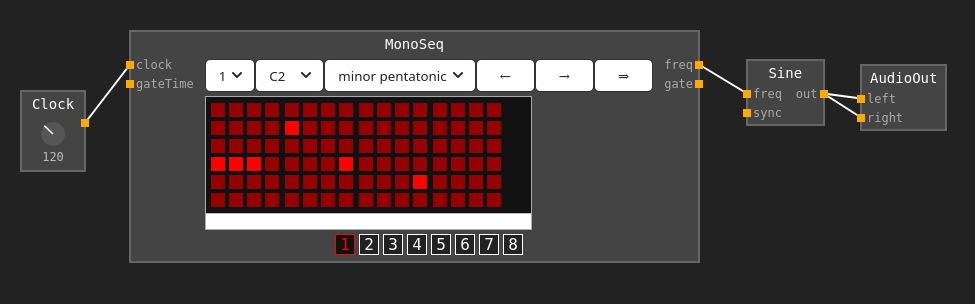
In order to make a sounds, you need 1) an amplifier. This is the last module in your chain of patch cords conveying your signals. On a digital modular synth, this might be called "out," 2) an oscillator which produces a sound wave; 3) something to control the frequency going into the oscillator, which could be a midi keyboard, a step sequencer with some notes selected (which will also require a clock in front of it so it actually moves), or a knob that you turn up or down to increase or decrease frequency for your oscillator. First in your chain is your voltage (frequency) controller (keyboard, clocked sequencer, or knob), second is your oscillator which actually produces your sound wave, and finally your amp which can turn the frequency signal into sound waves.

Basics for a synth played with computer keyboard:
Image

Basics for no keyboard (using a sequencer):
Image

These were made using a browser synth: https://z.musictools.live/

How much voltage does what? Each octave means a different volt. 1 volt might make middle C. 2 volts then will make C one octave higher. Each note is therefore 1/12th volts different from its neighbour. Synths with keyboards do this stuff in their own wiring.

Gates. This means turning a sound on and off. They're used to start "envelope generators," starting and controlling sequencers and switches. Tapping a key, for example, means turning a switch on and off, although on a keyboard you probably won't have control over this (it will be built in).

Envelopes (the label for the component might saw "envelope generator" or "adsr") control 3 things: amplitude, pitch, and harmonics. But when you look at the knobs on an envelope, you don't see those words; you see 4 other words, which you can adjust: attack, decay, sustain, release. Forget pitch and harmonics right now, and we're going to consider an envelope that just controls amplitude (volume) of each note you press. If a note is tapped, you only have to worry about 2 things: attack and release. Attack is how quickly the sound "fades in" to its maximum volume, and release is how quickly the sound fades out after the key has been released. But your note is not going to keep "attacking" after you released the key; it's only going to attack as high as you give it time for with your short key press, and if that time isn't enough to get to it's high point, it won't get to it's high point. Now If you plan on holding the note, you have two other things to think about: when you press and hold your key, and the key reaches it's maximum volume (decided with "attack"), does it decrease in volume a bit before holding it's sound? This decrease is called "decay," where you're still holding the key and it's going to sustain, but it's going to come down a bit before it sustains. Sustain is, when holding the key, what volume it plays at for as long as you hold it or until it's sustain time runs out. When you release your key, you'll hear your "release" parameter as the sound fades out afterwards.

Image

How to build a system:

Terms to Know (from https://www.synthesizers.com/begin.html )

  • Amplifying - Increasing a signals volume.
  • Analog - A signal that varies continuously.
  • Attenuating - Lowering a signals volume.
  • Control Voltage - .
  • Controller - A device that creates signals used to control modules. Examples: keyboard, wheel, ribbon.
  • Digital - A signal comprised of numerically computed values.
  • Envelope - A waveform that changes over time used to control parameters of a signal such as filtering and amplitude.
  • Gate - On/Off signal typically from a keyboard indicating a key is pressed. Used to trigger envelope generators.
  • Inverting - Reversing of the polarity of a signal.
  • Mixing - Combining of several signals. Technically, adding of voltages.
  • Module - An component of a synthesizer that performs a function, typically with an audio signal and/or control voltages, and can be moved to other locations within the system.
  • Monophonic - A system where only one note can be played at once. However, this note may contain many pitches from multiple oscillators.
  • Normalized - A synthesizer where most of the patching between functions is fixed. Example: MiniMoog.
  • Patch - A set of patch cables and module parameter settings used to create a specific sound.
  • Semi-Modular - A synthesizer where functions are logically separated and patchable, but modules are fixed into one location. Example: ARP 2600.
  • Sequencer - A component of a synthesizer that creates a series of voltages typically used to control oscillators, filters and other modules.
  • VCO - Voltage Controlled Oscillator. Creates waveforms. Frequency/Pitch is determined by knobs and pitch control voltage.
  • VCF - Voltage Controlled Filter. Removes harmonics from waveforms. Frequency is determined by knobs and control voltages.
  • VCA - Voltage Controlled Amplifier. Controls amplitude (volume) of a signal. Amplitude deterimed by knobs and control voltages.
  • Voltage Control - The concept where parameters are determined by voltages.

Tutorials here: https://www.synthesizers.com/tutorials.html
TTTThis

The transit system here is better than in my country

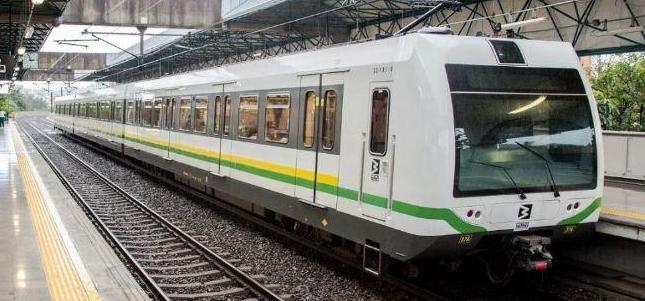
In this city theres a train line that services the city north-south. For paying for fares there are two options: one is buying a card that has four rides worth of value on it. The other (for citizens) is to buy a card you can recharge). You buy these at booths from people inside the station building/area. The four-rides option is a plastic credit-card style card.

To enter the train terminal, there are turnstyles with card readers. You place your card against the reader. A screen beside it displays how much value you are charged and how much remains. If it is the last of four rides, it tells you to insert the card (instead of keeping it in your hand as you enter). Then the turnstyle is unlocked and you pass through. There are transit workers here which can see no one is jumping over the turnstyle.

Image

Now you ride the train as much as you want until you exit a turnstyle at any station. There is a flat rate for taking the train anywhere and for any amount of time. You do not scan your card when you exit. You just exit. Therefore if you lost your ticket on the train you wont have a problem exiting.

The security workers for the train are therefore not tasked with 'policing' or 'checking tickets.' There is no uncomfortable and irritating ticket checks. There are no fines or the cost of processing fines. The workers who would be checking tickets and 'policing' in my country are here allowed to service the customers ie offer information and directions when asked and ensure physical safety and security.

The experience is easier and more comfortable and less aggravating. The cost of running this type of system appears to be much less because it involves less problems to have to deal with and perhaps less workers - in any case, the workers appeared to me of more value than the 'ticket checkers' etc in my country's city trains.

TTTThis

Risograph Printing

From what I've learned (I met some people in their riso printing studio the other day and learned the process and made some test prints), what can be done on risograph can be done on the regular photo service store printers, so I don't know if riso is that valuable.

The guys at the studio make their money from medium-sized runs (between 50 and a thousand or two) because its most cost effective than a photo studio but less so than (i forget the word but the machines used for bigger print jobs).

one thing is you have to do runs with riso, generally of 50 or more.

riso printers look like regular photocopy printers. there are four color drums (pink, blue, yellow, black). only one drum is in the machine at a time. you do your run with that color, then swap the color drum and print that color on the same pages. sometimes the color from one drum is still there for the next pages, so it can leave bands of color across the print (unfortunately). also, the first prints are less evenly colored (and darker generally) than the ones that are printed later on. The prints dont line up exactly. they can be adjusted i guess, somewhat like a lithograph machine, but i think less exactly. so sometimes your colors wont be lined up.

Image

to make other colors, two or more colors are mixed. the effect is good, though. Yellow and pink can make a bright, even orange.

The machine can add textures. There are two options. One is 'Screen tone' which is like dots like in Archie comics, and you can control the size of the dots (and spacing therefore) and the angle of the dots. The other option is 'grain touch' which is a patternless color fill that can look like charcoal rub when its not applied strongly.

The maximum size the machine can do is 11x17.

In order to prepare images to print, the images must be separated into the 4 colors (which each are saved as a greyscale image) to print. The four separate images are printed separately on the same page. One way to prepare these is to use Photoshop and convert the colors to CYNB. This automatically makes four color layers in (i forget the name but one of the) Photoshop window panes. Each of these can be printed (I forget if they have to be converted to greyscale first or if they can just be printed). Another option is to separate the four color phases of your print job into images and save them as a pdf).

Price for 50 prints (4 colors) on 11x7 carta bond 115g paper (fairly thick white paper) is (the equivalent of) $10usd (20 cents each).

TTTThis