Ecotanks. Can the unit be easily power cleaned? The inks will get clogged, and you will do regular (press two buttons and it takes 2 minutes) cleans. Some units also have a Power Clean built into them (so you don't need to do the Power Clean using your computer and software (sometimes not available on Linux). Power Clean uses up to 1/3 of the ink in each tank (waste) and it sends it to the Maintenance Box (which wears out the pads in it), and some units have Maintenance Boxes you can easily remove and swap out for replacements ($10 on some models). When the Maintenance Box gets full (it's smaller on some models) it will give an error message that you can't use the printer anymore (until you replace the Maintenance Box). Check the Maintenance Box for a sticker on it saying its product number, and you can buy these on Amazon (3rd party makers), Espon, etc., and have them ready for when your Maintenance Box clogs. Note that some sellers say their Maintenance Box works for printer models falsely, because some models don't have replaceable boxes. Some boxes don't have a chip, so you can't swap them out for another Maintenance Box with a chip. If there's no chip, you have to call Epson and they give you another code and you enter that in the machine and you can use it for a while more. You can buy codes third party (when Epson stops giving you one).
https://www.youtube.com/watch?v=dlvN3DuPBMI
Power Cleaning fills the maintenance box with the ink it uses for the Power Clean but doesn't print. It saturates the pads in the maintenance box (some boxes can't be swapped out, it seems). She says you don't even need to do Head Cleaning. Just use Purge Files.
Alternative cleaning method: just try to get the nozzles printing by doing pure colors. 'Purge File.' The Hex Codes for CMYK.


Purge file for Cyan

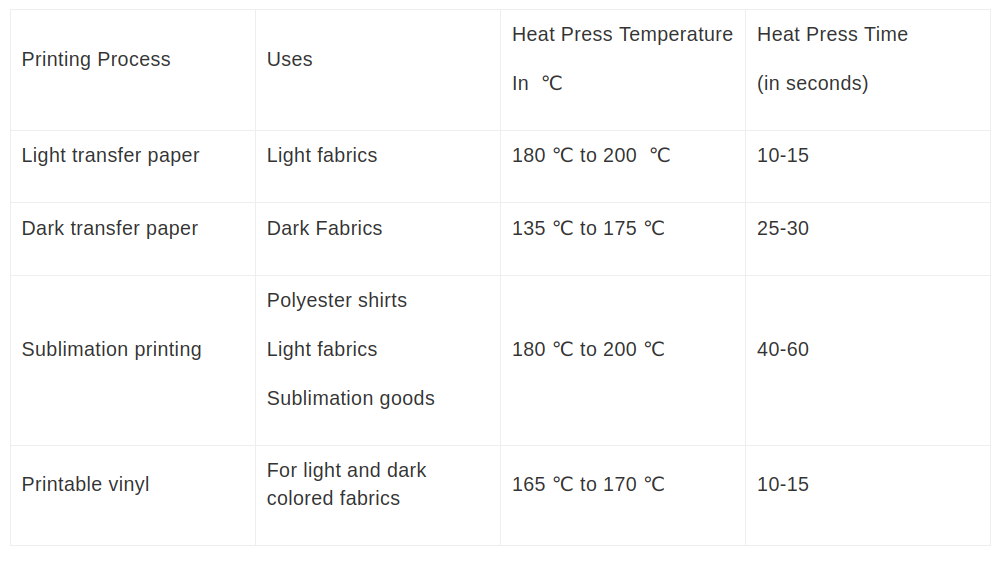
Heat press the shirt without the vinyl first (called 'pre-press'), to remove moisture. 10-20 seconds. (With or without Teflon.)
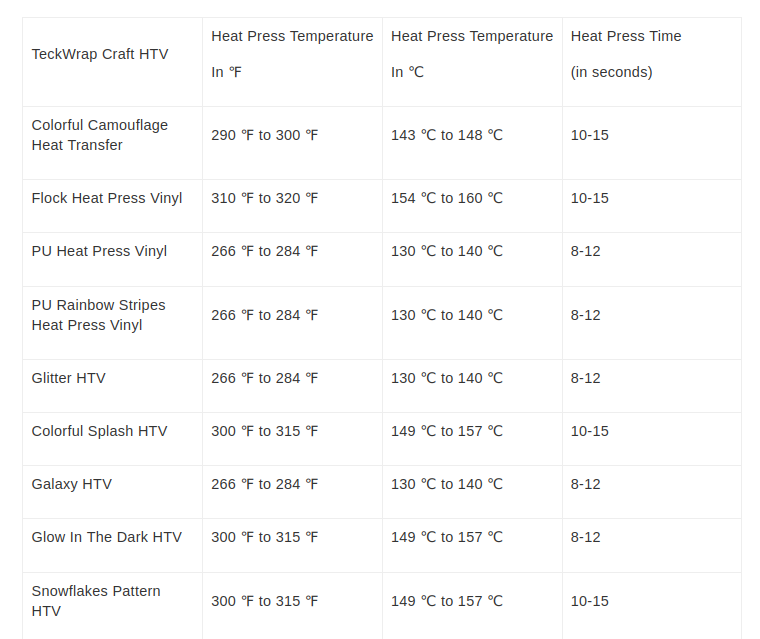
Times for some vinyls
(If it's new uncover the plastic from the cutting thing (and maybe do other setup stuff).
Place vinyl on plastic cutting grid sheet. Put it against the entry and click the arrow so it feeds in a bit.
(You can open the tray below if you want). (It can cut with the top cover open or closed). It should now cut.
Ootb it cut a little too deep, making marks in the plastic grid cutting sheet (not all the way through it).


