MX bookshops

Librería de Viejo "Pérgamo" is widely considered the most "serious" and intellectual shop on the street. It is run by a family of multi-generational booksellers who are deeply embedded in the city’s historical and bibliographic community.

The Expertise: The staff and owners here are known for their deep knowledge of 19th-century Mexican history and rare academic editions. They don't just know where a book is; they often know the provenance or the historical significance of the edition.

The Experience: Unlike the "warehouse" style shops, Pérgamo is meticulously curated despite the towering stacks. It is a frequent haunt for UNAM researchers and professional historians.


Librería El Hallazgo is another outlier on Donceles because its staff is almost exclusively composed of literature and history students or graduates.

The Staff: You will find that the people working here can actually discuss specific authors, movements, and historical contexts with you. They are particularly strong in philosophy and 20th-century literature.

The Inventory: Because the staff is educated, the "finds" here are better filtered. You won't have to dig through mountains of junk to find a quality historical text.

TTTThis

Libreboot on t480

Will remove spyware (networking and remote access) but leaves part of the blob.

Note, libreboot has been forked because the original people started using proprietary hardware. https://www.youtube.com/watch?v=Sg3bPvBF3bs&t=13s

Hardware

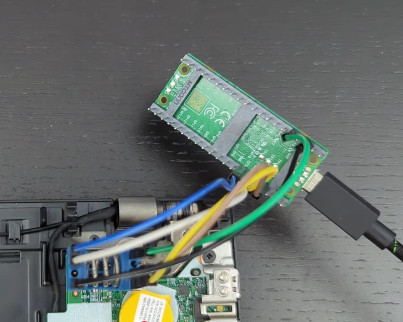
  1. A CH341A Programmer or Raspberry Pi Pico ($4 - $6 USD): To physically connect to the BIOS chip.

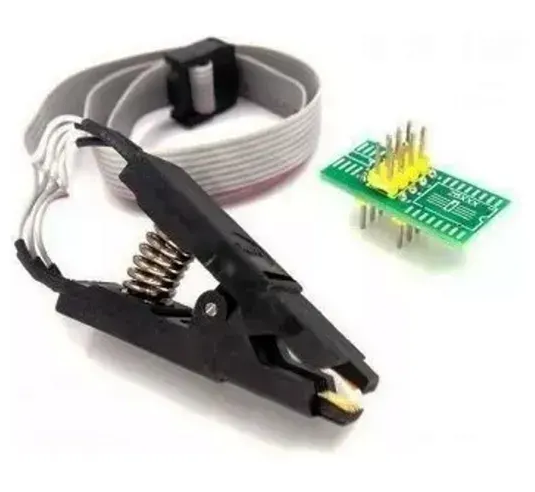
  2. SOIC-8 Clip ($12 - $18 USD): To attach to the chip without soldering (though some prefer soldering for stability).

  3. A Second Machine: To run the flashing software (your X230 is perfect for this).

Video: https://www.youtube.com/watch?v=iGKhsjvlSBQ&t=2s Got to 10:00 for connecting the clip.

Process:

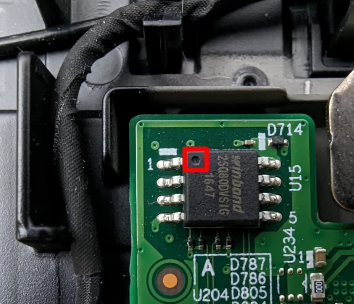
Disconnect battery and stuff, put clip (which is wired to Pico) to little Thunderbolt chip, then connect the USB cable to the 2nd computer so you can start flashing.
Image

Image

Image

Electronics District on Calle de República de El Salvador, 10:00 AM to 6:30 PM.

Specific hubs where the "serious" parts are kept:

SGE México (Aldaco 16-C): Just half a block off El Salvador. They are specialists in repair components and almost always have SOIC-8 clips and CH341A programmers in stock. Price: Around MX$95 – MX$175 (~$5.30 – $9.80 USD) for the clip itself. Can also probably buy a Pi Pico here.

LionChip México: A very reliable shop for hobbyist electronics and programmers. They often sell the "Kit" which includes the clip, the breakout board, and the ribbon cable. They also might have the Pi Pico.

Plaza del Salvador(The "Electronics Plaza"): If the individual shops are busy, enter this multi-story plaza. Walk past the consumer speakers and LED strips to the smaller stalls on the second or third floors—these are the ones that sell specialized IC test clips and EEPROM tools.

"Busco una pinza de prueba SOIC8 (o SOP8) para programar BIOS/EEPROM."

If you are trying to flash a BIOS or internal chip, make sure you get the kit that includes the adapter board (the tiny green PCB that converts the clip's ribbon cable to standard pins).

Check the Voltage: Most SOIC-8 clips on El Salvador are intended for 3.3V or 5V. If you are working with a modern low-voltage chip (1.8V), ask if they have the "Adaptador de 1.8V" as well, or you risk frying the chip.

Quality Check: Before you leave the shop, open the bag and check that the gold pins inside the jaws of the clip are straight. These clips are notoriously fragile, and a single bent pin will make it impossible to get a "read" on your chip.

If you can't get the Pico at SGE Mexico,

*"Pico para Python." * AG Electrónica (República de El Salvador 20): This is the "big" reliable professional shop. They have a massive inventory system.Price: Around MX$90 – MX$120 (~$5.00 – $6.70 USD) for the standard Pico.
TTTThis

G&S skate pants

The reason they feel "thin like pants but look like jeans" is due to three specific design elements:

  1. Material: 100% Lightweight Cotton Twill

Unlike standard denim, which is usually a heavy "12oz" or "14oz" fabric, these are made from a much lighter 6oz to 8oz cotton twill. It has the same diagonal weave as denim, but it's significantly thinner and more breathable, which is why it drapes differently—moving more like a pair of pajamas or "surf pants" than stiff jeans.

  1. The "Crackle Print" Finish

The "crackle" or "acid" print on that specific eBay listing mimics the visual texture of heavily washed denim without the actual weight and bulk of a thick indigo-dyed fabric. This was a common technique in the early 90s (around 1990–1992) to give lightweight cotton a "denim-adjacent" aesthetic.

  1. The "Beach/Surf" Construction

These are often categorized as "Beach Pants" or "Surf Pants." Key identifiers from that listing include:

Elastic Waistband + Drawstring: This is the dead giveaway. It provides the comfort of sweatpants while the faux-fly and pocket structure mimic "real" pants.

High Rise & Baggy Taper: They are cut very wide in the seat and thighs (the listing mentions the waist can expand significantly) but taper down toward the ankle. This "baggy taper" is the signature silhouette of early 90s skate gear.

TTTThis

MX

Image

Marcela Turati – Fuego Cruzado

Oswaldo Zavala – Los cárteles no existen

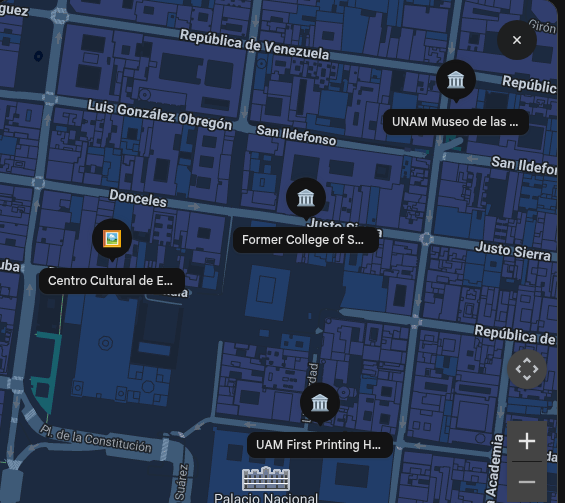
If you are looking for these titles in the Centro Histórico, the UAM First Printing House in AmericaClick to open side panel for more information houses a bookstore that often carries academic and socio-political texts.

Events in the Centro Histórico (March 25, 2026)

This Wednesday is "Museum Night" (Noche de Museos), and several venues have sessions related to media and documentation:

Former College of San Ildefonso: Featuring a session titled "Tu última literatura," focusing on contemporary literary expression.

UNAM Museo de las Constituciones: While primarily focusing on legal history, this venue is a key spot for understanding the evolution of Mexican law and governance.

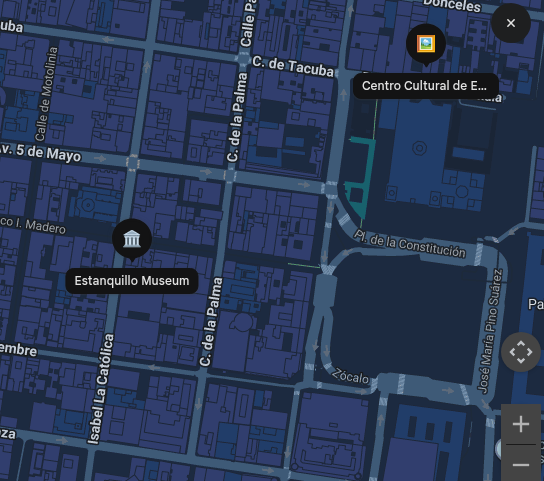
Centro Cultural de España: The exhibition El Ojo Desarmado (The Unarmed Eye) is currently on display. It critically examines patriarchal systems and visual culture, which may interest you given your focus on ethics and narrative.

Image

Estanquillo Museum: Hosting a session on the history of Fania Records and its cultural impact, which aligns with the study of cultural narratives.

Image

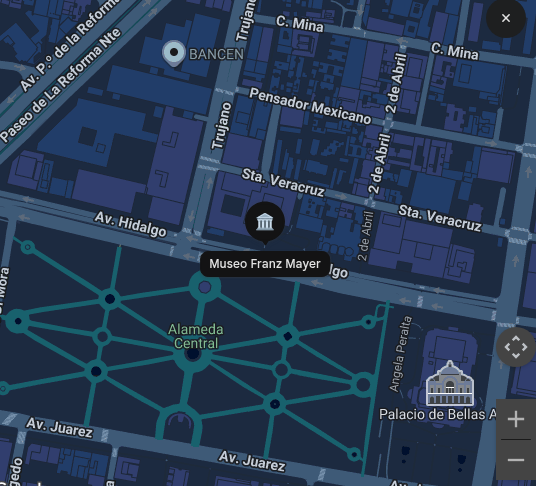
Museo Franz Mayer: Currently running ¡Moda hoy!, which explores fashion as a medium for resistance and political expression—a theme that parallels how journalists use their craft to resist violent narratives.

TTTThis

Troubleshooting Qemu VM

When booting, it suddenly just goes to (initramfs). NOTE this will reset the VM ie you lose everything on it. I didn't research yet a way to just recover without losing data.

  1. type blkid ... and look for something that has ext4 (ie looks like a filesystem)
  2. fsck /dev/sda1 -y (modify this for your disk path ... this should check and fix the corrupt partition
  3. reboot -f

...

When transferring from another computer, It says you are in emergency mode. .. journalctl -xb to view system logs... ... Press Enter to contimuie. This is probably because it is looking for a shared folder, which has changed.

You need to edit the boot instructions in the GRUB menu (the black screen with text that appears for a few seconds when you first start the VM).

  • Restart the VM. 2. As soon as it starts, tap the e key on your keyboard repeatedly until you see a screen full of text.
  • Use the arrow keys to find the line that starts with linux. It usually looks like this:
  • linux /boot/vmlinuz-... root=UUID=... ro quiet splash
  • Move your cursor to the end of that line.
  • Delete the words ro quiet splash and replace them with:
  • rw init=/bin/bash
  • Note: rw tells Kali to let you edit files, and init=/bin/bash tells it to skip the login screen and go straight to a terminal.
  • Press F10 (or Ctrl + X) to boot with these settings.

Then

  • Open the drive list: nano /etc/fstab
  • Look for the "Bad" line: You are looking for any line that mentions a secondary drive, a shared folder, or an old "swap" partition that might have had a different ID on your other Kali machine.
  • Comment it out: Put a # at the very beginning of that line so Kali ignores it.
  • Save and Exit: Press Ctrl + O, then Enter to save. Press Ctrl + X to exit.
  • Force a Reboot:
  • Since you bypassed the normal system, you have to "force" it to restart:
  • exec /sbin/init (or just restart the VM from your VirtualBox/VMware window).
TTTThis